 DataMosaic
 A
#Before you start: count the rows
Select the first column of each file and read the count in Excel's status bar, or use =COUNTA(A:A). It takes ten seconds and decides which method you need.
Take an invented Monday at a 120-store chain. The till system's export, tills_mon.csv, has 2,412 rows. The ERP's export of the same day, erp_sales_mon.xlsx, has 2,410. Two rows are missing somewhere, and any comparison that works cell by cell will light up every row after the first gap. If your counts differ, skip to method 3.
#1. Highlight cell differences with conditional formatting
When both sheets have the same columns and the same rows in the same order, one rule is enough.
- Put both sheets in one workbook: right-click the second file's sheet tab, choose Move or Copy, and pick the first workbook. Call the copy
ERP export. - On the first sheet, select the data from
A2to the last cell. - Go to Home › Conditional Formatting › New Rule and choose Use a formula to determine which cells to format.
- Enter the rule below, choose a fill colour, and press OK.
=A2<>'ERP export'!A2Leave out the $ signs. A relative reference moves with each cell, so every cell is compared with the same cell on the other sheet.
Two cells that look the same can still be flagged: a number stored as text, a trailing space, or a value rounded by its format. Wrapping both sides in TRIM, VALUE or ROUND makes them comparable.
#2. Spreadsheet Compare, on Windows
Microsoft's Spreadsheet Compare opens two workbooks side by side and colours what changed: entered values, calculated values, formulas and formatting. Search for Spreadsheet Compare from the Start menu, then choose Home › Compare Files.
It only comes with Office Professional Plus 2013, 2016 and 2019 and with Microsoft 365 Apps for enterprise, so many copies of Excel do not have it. Like the rule above, it compares cell by cell, which makes it right for two versions of one workbook and wrong for exports from two systems.
#3. Match rows on a key with XLOOKUP
When the rows come in a different order, or some are missing, stop comparing positions and compare keys. A key is the column, or columns, that names the same thing in both files: the store and the date, the SKU and the location, the order number.
In the till sheet, look each store up in the ERP sheet, then subtract:
=XLOOKUP(A2, 'ERP export'!A:A, 'ERP export'!D:D, "Missing")XLOOKUP is in Excel for Microsoft 365, Excel 2021 and Excel 2024. In Excel 2016 or 2019, the same lookup is:
=IFERROR(VLOOKUP(A2, 'ERP export'!A:D, 4, FALSE), "Missing")| Store | Till total | ERP total | Difference |
|---|---|---|---|
| Store 014 | 4,812.40 | 4,812.40 | 0.00 |
| Store 027 | 3,190.00 | 3,141.50 | 48.50 |
| Store 031 | 2,977.10 | Missing | 2,977.10 |
| Store 044 | 5,204.75 | 5,204.75 | 0.00 |
Invented figures. Store 031's day never reached the ERP, and Store 027 is 48.50 apart.
Filter the difference column for anything that is not zero. Then do the same lookup the other way round, from the ERP sheet into the till sheet: one direction finds the rows the ERP is missing, and only the other finds the rows the tills are missing. When a row needs two columns to name it, join them in a helper column first, as in =A2&"|"&B2.
#When the files come from two systems, every night
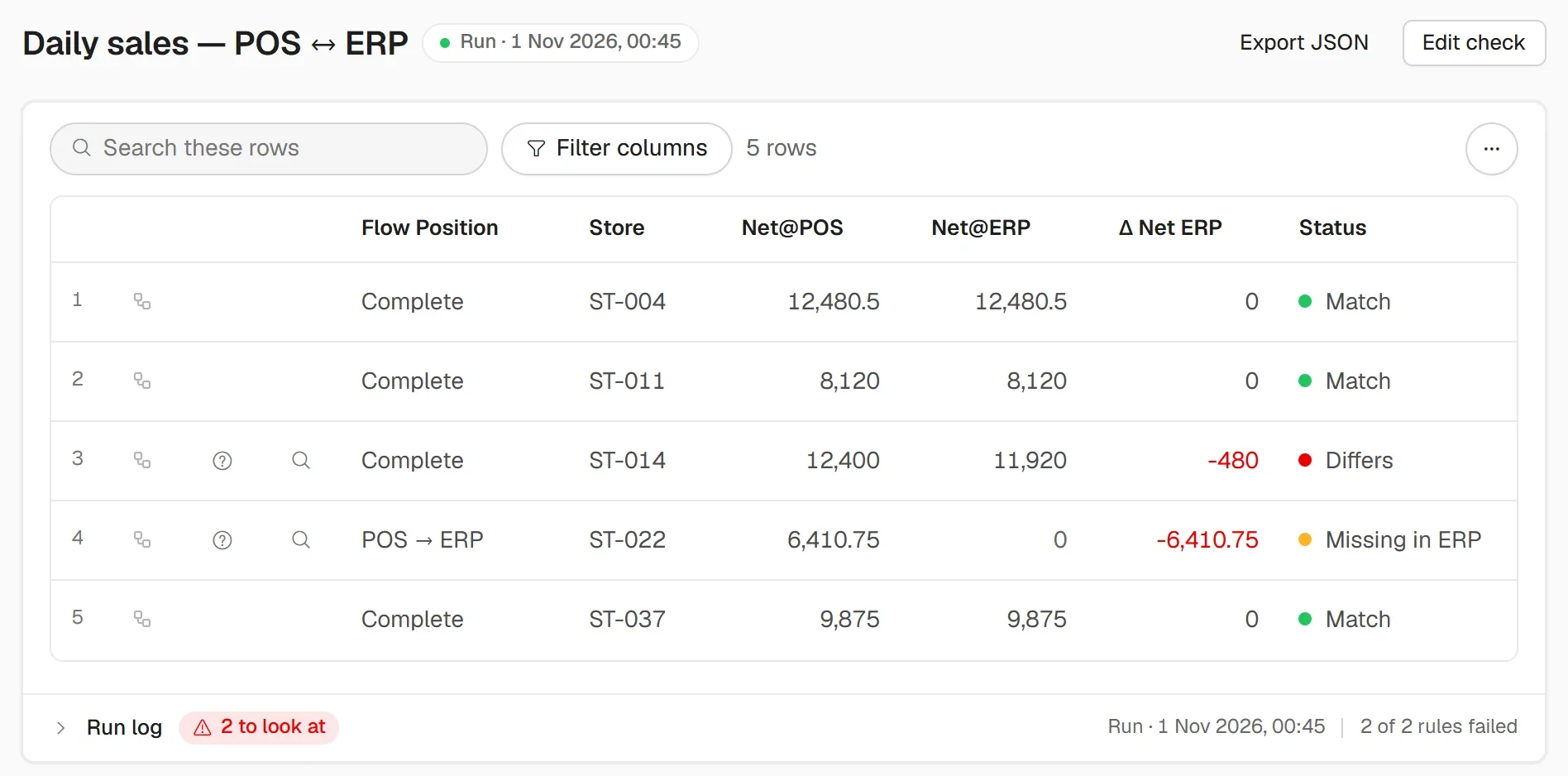
If the two files are the till export and the ERP export, you will compare them again tomorrow, and the day after. That is the point where the spreadsheet stops being the tool and becomes the job.
A check that runs at night, against the systems themselves, has the table above waiting before anyone arrives. It also says why each row differs, so the morning starts with the answer rather than the exports.
#Questions people ask
#Can Excel compare two files automatically?
Only cell by cell. Conditional formatting and Spreadsheet Compare both assume the rows line up. When they don't, you need a key and a lookup, or a tool that matches rows on a key.
#How do I compare two Excel files without uploading them?
Use the formulas in this guide, or Spreadsheet Compare if your edition of Office has it. Both work on your own machine, and neither file leaves it.
#How do I find rows that are in one file but not the other?
Look up every key of the first file in the second, and every key of the second in the first. A missing result in either direction is a row the other side does not have.
#Why does Excel say two identical-looking values are different?
Usually a number stored as text, a trailing space, or a decimal hidden by the cell format. Apply TRIM, VALUE or ROUND to both sides before comparing.