 DataMosaic
Mosaic · How it works
How Mosaic finds the reason.
A comparison can only tell you two numbers differ. DataMosaic can say why, because it knows how the record was meant to travel in the first place.
01
Model the flow, not just the numbers.
Every reconciliation in Mosaic is a path: where a record is created, what moves it, and where it should end up. That path is the thing that makes an explanation possible.

02
Define what counts as correct.
For every step you say what should be true. Mosaic doesn't force your process into a template — every business has different systems, every integration has different rules, and every company has its own definition of a valid transaction.
- what data should move
- how it should be transformed
- what conditions must be true
- what counts as an exception
- where the data should end up
That logic becomes a reusable control that runs again and again.
03
Check reality against it, continuously.
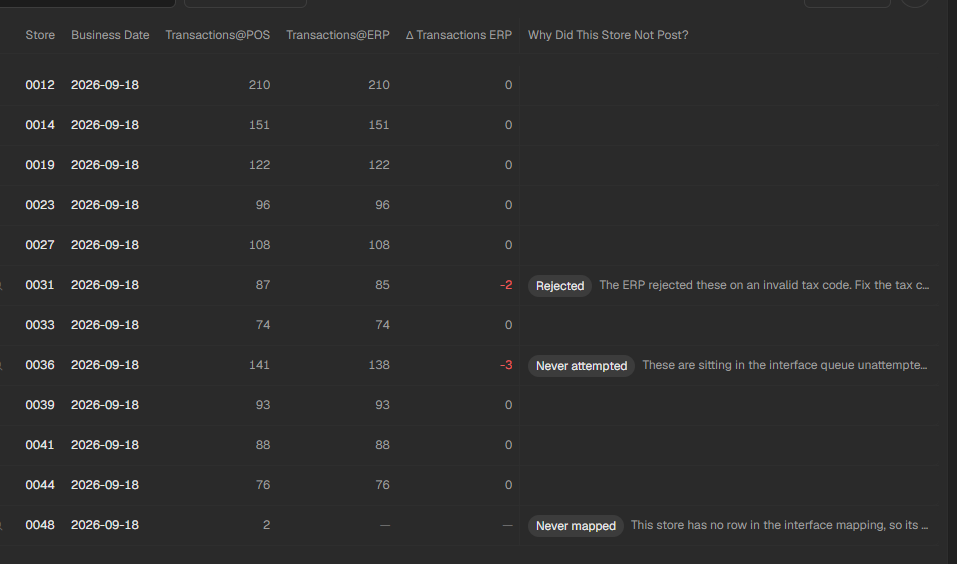
Once the control exists it runs on its own — every store, every night — and the result is a count, not a spreadsheet.
04
Follow the exception to its cause.
This is the step a comparison cannot do. Because Mosaic knows the path, it can ask each stage of it what it saw.
sales missing
transactions found in the POS
reached the integration layer
were rejected
2 receipts with a line that took no taxT-0031-0475 T-0031-0480
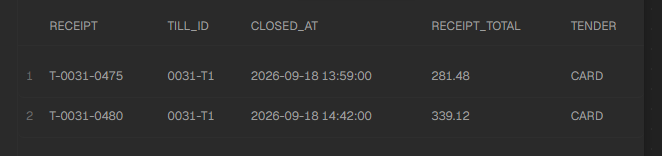
Was it missing, did it fail to move, was it rejected, was it mapped differently, did the systems use different business rules, or was it simply not there yet? Mosaic answers the one that happened.